Restoring an Archived Animal
Occasionally you may wish to restore an animal from the archive list back into the current animal list. For example you may wish to write a report that is confined to active animals.
The following will take you through the steps to restore archived animals:
1. Go to Animals and select Archived
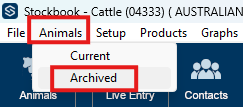
2. Select the Animal/s
- Click on the animals you wish to restore, and then select Make Current
- To select more than one individual animal, hold down the “Ctrl” button whilst selecting
- To select all animals, hold down the “Shift” button and click the first and last animals in the list
3. Click on Make Current box
Article ID 891